
How can we help?
Why is my first invoice different from my monthly service fee?
Your first PacketSky invoice may be different from the standard monthly fee shown on your order.
This is usually because the first invoice includes a pro-rata service charge, once-off fees or the next month’s service fee in advance.
What does pro-rata mean?
A pro-rata charge covers only the portion of the month during which your service was active.
For example, if your service becomes active halfway through a 30-day month, the first service charge may be approximately half of the normal monthly fee.
You are not charged a full month for days before the service was activated.
What can appear on the first invoice?
Your first invoice may include:
- A pro-rata service fee for the activation month
- The next month’s service fee in advance
- Installation fees
- Connection or activation fees
- Router or hardware charges
- Delivery fees
- Other approved once-off charges
Not every order includes all of these items.
Why might the first invoice be higher than expected?
PacketSky services are billed in advance.
If the service is activated after the normal monthly invoicing process has already been completed, your first invoice may contain:
- The pro-rata amount for the remaining days of the current month
- The full service fee for the following month
- Any applicable once-off charges
Although this may make the first invoice look high, it does not mean you are being billed twice for the same period.
Example 1: Activation in the middle of the month
Suppose your service is activated on 16 April.
The first invoice may include:
- A pro-rata service fee for the remaining part of April
- Any applicable once-off charges
Depending on when the normal monthly billing run occurred, the May service fee may appear on the same invoice or on the next invoice.
Example 2: Activation near the end of the month
Suppose your service is activated on 29 April after the May billing run has already been processed.
The first invoice may include:
- A pro-rata service fee for the final days of April
- The full May service fee in advance
- Any applicable once-off charges
How can I check the billing dates?
Look at the service line on your invoice.
The description or date range should indicate the period covered by the charge.
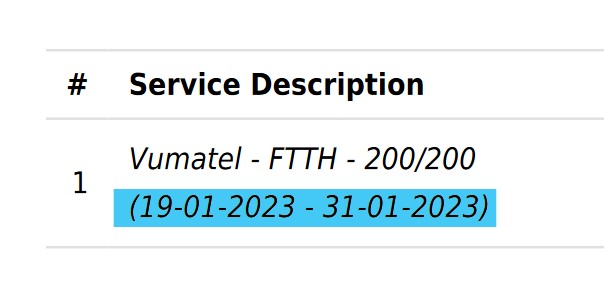
Above is an example of the billing date range shown on a PacketSky invoice.
Still unsure about the amount?
Log in to the PacketSky Customer Portal to view the full invoice and account balance.
Contact our Accounts Team if you believe:
- The activation date is wrong
- The billing period overlaps another charge
- A once-off fee was not agreed
- The package or price is incorrect
- A payment or credit is missing